Endpoint monitoring for every workstation and laptop
A small agent for Windows, Ubuntu and macOS reports from every workstation once a minute: whether it is reporting, how secure it is, which applications people actually use and which installed software nobody has opened in thirty days.
Book an endpoint demoWorkstations don't have a fixed address
Servers stay where they are; laptops do not. They move between offices, homes and hotel Wi-Fi, sleep for days and change IP address every time. Pinging them tells you nothing. Rapitt's endpoint agent reports in on its own schedule, and the console infers the state from that cadence: reporting, late or silent.
The agent sends a reading every minute and checks for new settings every ten. A single switch in the console pauses every agent in the fleet, for example during a change freeze.

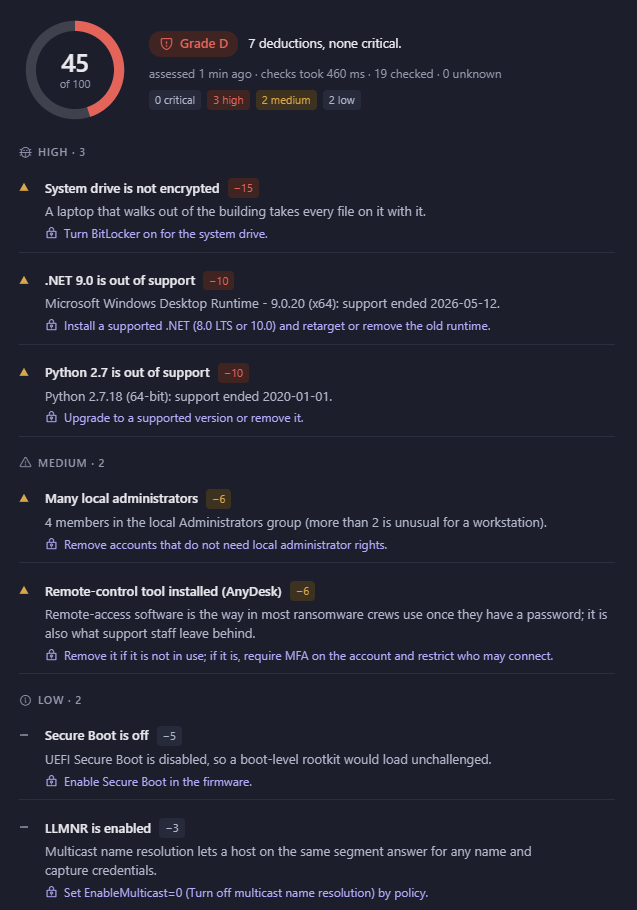
Workstation security, graded
Every endpoint receives the same A–F security grade as a server, from the same nineteen checks, weighted for a machine that leaves the building. An unencrypted system drive is a high finding on a laptop. Out-of-support runtimes — .NET 6, Python 2.7 — and remote-control tools are named with their version.
Because servers and workstations share one security view, the weakest machine in the organisation is easy to find, whatever kind it is.
Software usage tracking and licence recovery
The agent measures hours of attention per application: time the window was in front of the user, with idle and locked time excluded. That is a far better guide to what an organisation depends on than install counts or process lists.
Its counterpart is the licence-recovery list — software installed on a device but never opened in thirty days, with vendor, version and size. Paid seats on that list can be reclaimed at the next renewal.

Windows
An .msi package for Group Policy, Intune or manual installation.
Ubuntu
A .deb package installed as a system service.
macOS
A signed .dmg for MDM or manual installation.
Endpoint monitoring questions
How is a device enrolled?
Each package carries an enrolment token for your tenant. Install it and the device appears in the console on its first report, assigned to the client the token belongs to.
Does usage tracking record what users type or view?
No. It records which application had focus and for how long. No keystrokes, screenshots, window contents or browsing history are collected.
What does the agent cost in resources?
A reading is a small JSON payload once a minute over HTTPS. The agent sleeps between readings and pauses entirely when the console switch is off.