Server security assessment, graded A to F for every host
Rapitt runs nineteen security checks on every server and workstation it monitors, scores them on the server from facts the last scan gathered, and gives each host a grade from A to F. Every finding carries the setting or action that fixes it.
Grade your fleet in a demoWhy a security grade, not another dashboard
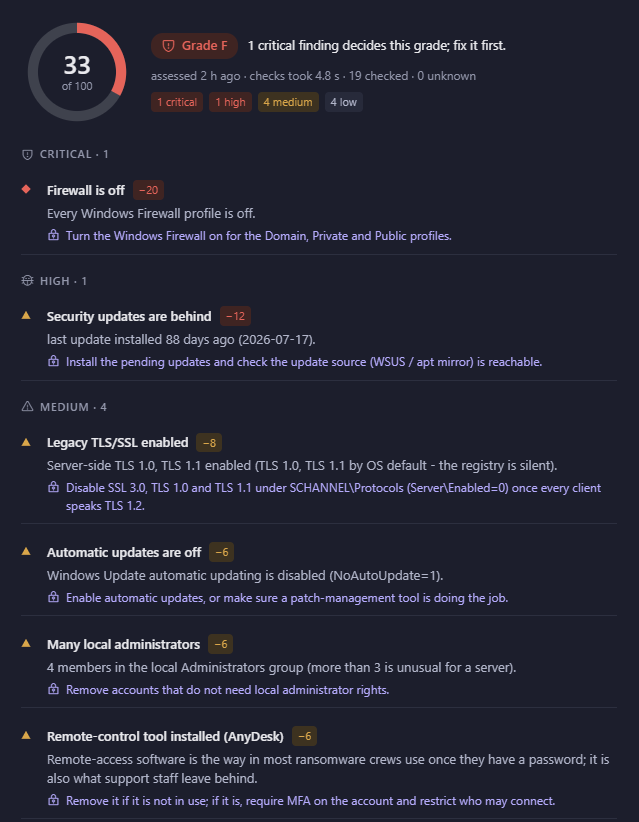
Most server security problems are found after the incident: a firewall profile switched off during troubleshooting and never switched back, security updates 88 days behind, a remote-control tool left installed by a contractor. Each is visible on the machine. What is missing is someone looking at every machine, every day, in the same way.
A grade answers the question a manager actually asks — how safe is this host? — in one letter, and the findings underneath answer the question an engineer asks next: what do I change? Because the score is built from measurements, two engineers looking at the same host will reach the same conclusion.
The assessment runs in a few seconds per host and adds no load to production servers beyond the regular five-minute sweep.
The 19 security checks
The checks cover the hardening baseline most frameworks share. They are grouped here the way the console groups them.
Perimeter
Firewall state for domain, private and public profiles; RDP network-level authentication; listening services exposed beyond the host.
Patching
Days since the last security update, automatic updates, operating-system support status and out-of-support runtimes such as .NET and Python.
Malware defence
Antivirus present and running, real-time protection, and the age of its signatures.
Protocols
Legacy TLS 1.0/1.1 and SSL enabled, SMBv1, LLMNR and NetBIOS name resolution that invite credential relay.
Accounts
Members of local Administrators, the guest account, User Account Control, and remote-control tools such as AnyDesk or TeamViewer.
Platform
System-drive encryption, TPM presence, Secure Boot, and the hardware facts the grade is weighted by.
How the grade is calculated
Each finding has a severity — critical, high, medium or low — and a weight. The score out of 100 is what remains after the weights are subtracted. The letter follows the score with one rule on top: one critical finding decides the grade. A host with its firewall off is an F until the firewall is on, however good everything else looks.
Weights depend on the machine. An unencrypted system drive is a high finding on a laptop that leaves the building and a low one on a rack server in a locked room. Four local administrators is unusual on a workstation and tolerable on a server. The grade is fair to the role the host plays.
Evidence an audit can use
Passed checks are listed beside failed ones, so a reviewer sees what was verified, not only what went wrong. A “what was seen” section records the operating system, antivirus product, firewall profiles, encryption state, update history and installed software the score was built from, with the time of the scan.
The fleet summary shows the average score, how many hosts need work, how many have antivirus off or missing, and how many run an operating system past end of support — the four numbers most security reviews start with.
Workstations are graded the same way
The endpoint agent sends the same facts from laptops and desktops, and the same nineteen checks run on them, weighted for machines that travel. Servers and workstations appear in one security view, so a weak laptop is as visible as a weak domain controller.

Security grading questions
Does the assessment install anything on the server?
No. For servers reached over a VPN the facts are collected by the same read-only snapshot the regular sweep uses. Servers outside a tunnel run the optional server agent.
Which operating systems are assessed?
Windows Server and Windows desktop editions, Ubuntu, SUSE and other Linux distributions, and macOS through the endpoint agent. Checks that do not apply to a platform are marked as such rather than failed.
How often is the grade updated?
On every sweep, every five minutes. Fix the firewall and the grade changes on the next reading; the history keeps the earlier grade for comparison.
Can grades trigger alerts?
Yes. A grade falling below a threshold, or a new critical finding, is an alert kind like any other and follows your alert routing.